

Product Introduction #
The Speech Recognition Module is an AI offline speech recognition product. It can convert speech into text or commands. First, it needs to record our speech with a microphone, and then the recorded speech will be processed into a series of special digital signals.
In the Speech Recognition Module, we have pre-recorded instructions, and the corresponding data are shown in the following table:
| Instructions | Output Data |
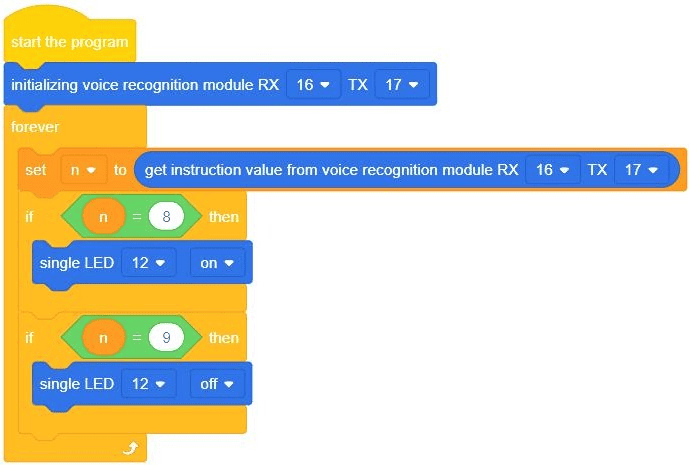
| turn on the light | 8 |
| turn off the light | 9 |
It should be noted that the accuracy of speech recognition can be affected by many factors, such as the speaker’s accent, speech rate and surrounding noise, etc. It is recommended to use it in a quiet environment.
The V3.0 version of the Speech Recognition Module adds the function of voice self-learning, allowing users to learn one wake word and multiple command words, can deal with different language adaptation problems, and supports users to use personalized wake words and command words.
Parameter Specification #
| Parameter | Value Description |
| Working voltage | 3.3V~5V |
| Working temperature | -40°C~+80°C |
| Communication mode | Serial communication |
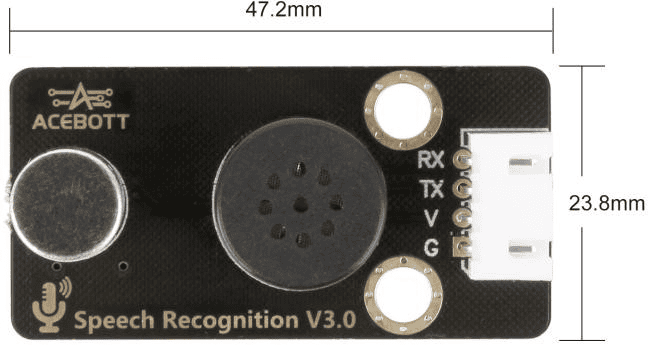
| Size | 4.72cm*2.38cm |
Wiring Diagram #
Note: The ESP32 controller board is already connected to the quick-connect expansion board.
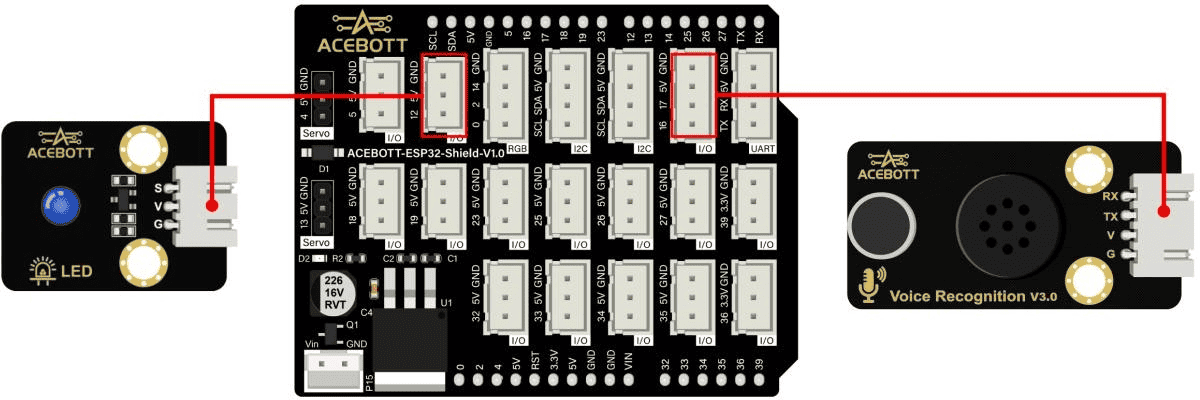
| Speech Recognition Module | ESP32 |
| VCC | 5V |
| GND | GND |
| TX | Pin 17 |
| RX | Pin 16 |
| LED Module | ESP32 |
| VCC | 5V |
| GND | GND |
| Sign | Pin 12 |
Sample Code #
Click to open the voice-controlled program Voice_Recognition.sb3
Test Results #
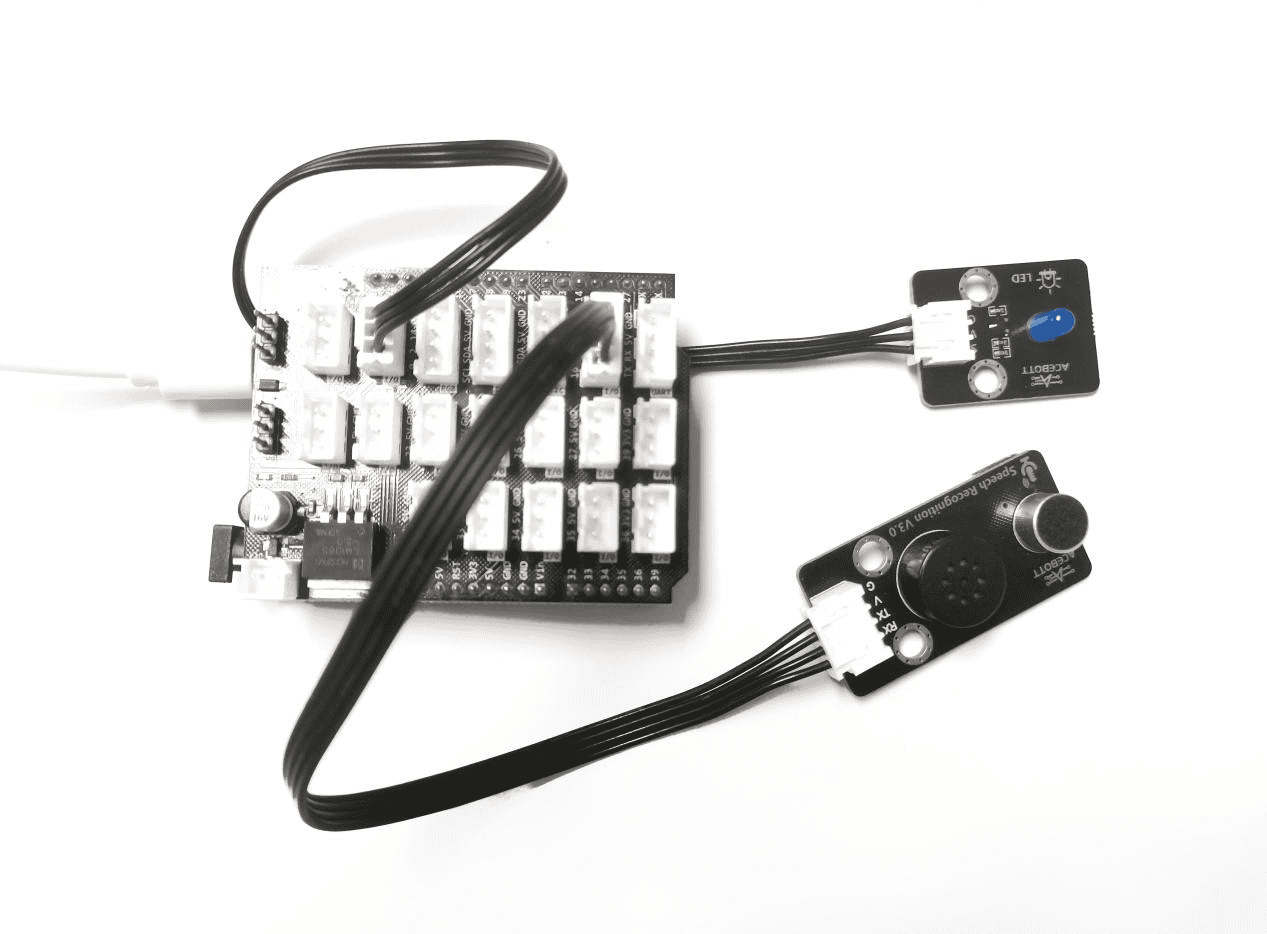
When the program is uploaded, the voice module first announces “Hello I am Lumi”. This allows users to wake up and say voice control commands. The wake-up phrase is “Hi Lumi”. After receiving feedback from the voice recognition module, users can continue saying “turn on the light” to activate the LED lights. Similarly, saying “turn off the light” will turn them off.
Note: If no new command is entered in the voice module within 30 seconds, it will go to sleep mode and announce “see you later”, at which time you need to wake up again with “Hi Lumi”.
Upload Custom Voice Firmware #
1. Write Speech Firmware #
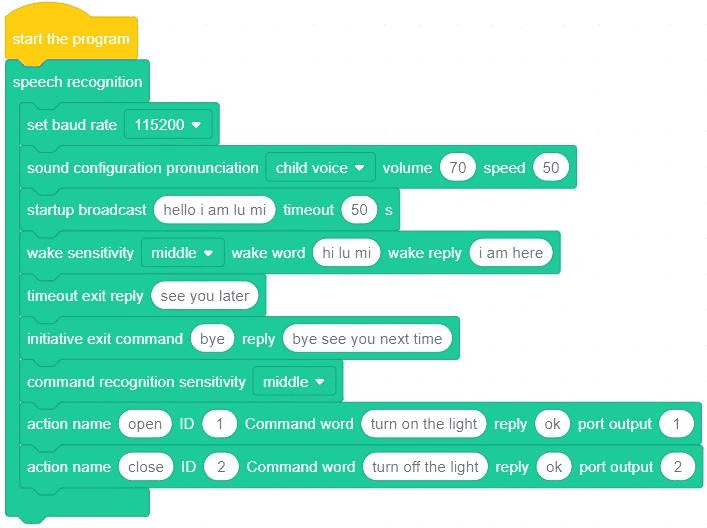
The firmware of the Speech Recognition Module can be customized. If you need to change the firmware, you need to modify the firmware instructions and upload the firmware again.
Click to open the firmware reference program Voice firmware.sb3
2. Instruction Set for Firmware #
 The command can set three parameters, which are the dialogue character, the volume and the speed of speech.

This command can set the voice to be played when the voice module is started.

This command can set the wake word and reply statement.

This command can set the statement that the voice module will broadcast when it enters sleep.

This command can set the voice command when actively exiting the voice conversation.
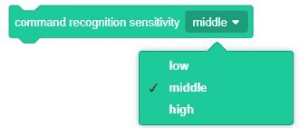
This command can set the sensitivity level of speech recognition, which is set to medium by default.

This directive is used to set the voice command word, including the behavior name, ID, voice command content, reply content, and output port number setting.
(1)[Behavior name] indicates the behavior corresponding to the voice command word. Different language commands should be set with different behavior names.
(2)[ID] is used to identify different voice commands. Ensure that it is unique and does not match the ID of other voice commands.
(3)[Command words] Voice commands used to realize a certain behavior. It is recommended to use speech content with accurate meaning, and illegal words are strictly prohibited to ensure the standardization and recognition of instructions. Command words should be separated by spaces.
(4)[Port output]
①It indicates that the Speech Recognition Module converts the data form after successfully recognizing the speech content, and the data will be passed to the main control board. The main control board can determine whether the corresponding command word is obtained according to this data;
②Data can only be set to hexadecimal numbers;
③If the input data is a 1-bit or 2-bit value, such as “1” or “E9”, it can be directly input;
④If the input data is a number of three or more digits, each number is separated by a space such as “28 6A”;
⑤When you enter an odd number of digits, such as “86A”, you need to add a zero in front of it, such as “08 6A”, and then enter it.
(5)The system supports a maximum of 50 voice commands.
3. Upload Firmware #
(1)ConnectionSettings
Connect the voice recognition module to your computer using a USB cable. The ACECode serial communication port will now display an additional “COM6” port in its list of available ports. This port number is randomized and may change based on actual conditions. Clicking this newly added port will establish communication between the ACECode and the voice recognition module. Once connected, the connection status indicator on the button will transition from “Unconnected” to “Connected”. Additionally, set the mode to “Upload Mode”.

(2)GeneratingSpeech Recognition Firmware
①Click “Generate firmware” and this process takes about 1-3 minutes

②The progress can be viewed in the serial port monitor.
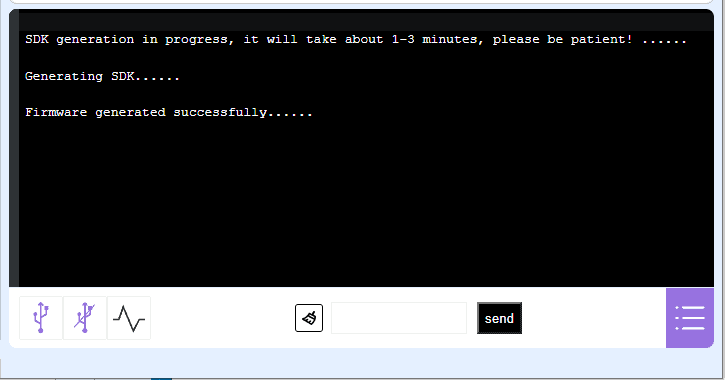
③After the firmware is generated successfully, a pop-up window will appear. At this time, you need to press the “Reset” button of the Speech Recognition Module to upload the firmware to the Speech Recognition Module.
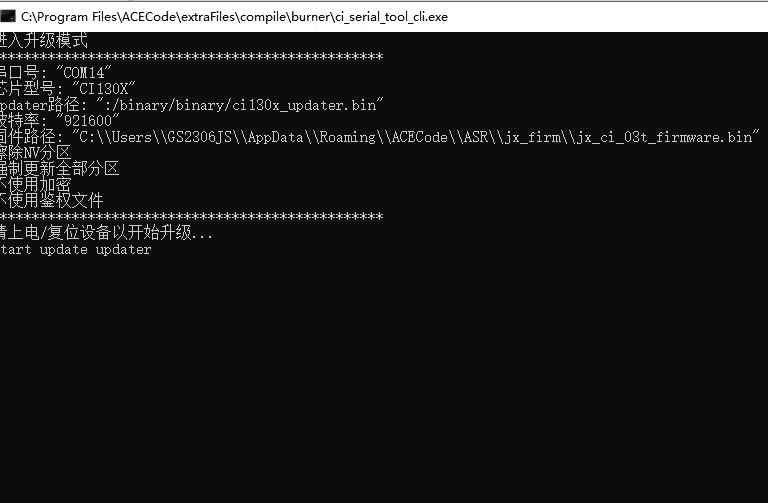
Note: After the pop-up window appears, you need to press the “Reset” button on the voice recognition module within 10 seconds. Otherwise, the pop-up window will automatically close and you need to regenerate the firmware.
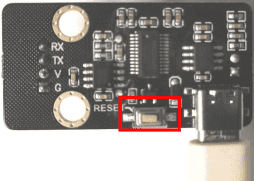
(3)TestCustom Speech Recognition Commands
Next, you can activate the voice recognition module using your preset wake word. You can then test each voice command to see if it works. If the voice recognition module accurately responds with the corresponding reply when you say the command, this confirms that the new firmware has been successfully uploaded. Afterward, you can use these commands in other apps to have the voice recognition module perform the corresponding functions.
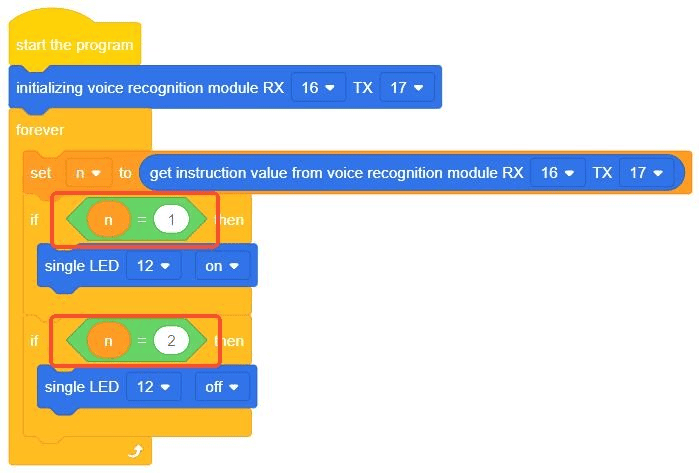
Note: Since the firmware has modified the output data, it is necessary to re-upload the program for voice control of the LED, changing the original output data 8 and 9 to 1 and 2.
Voice Self-learning Function #
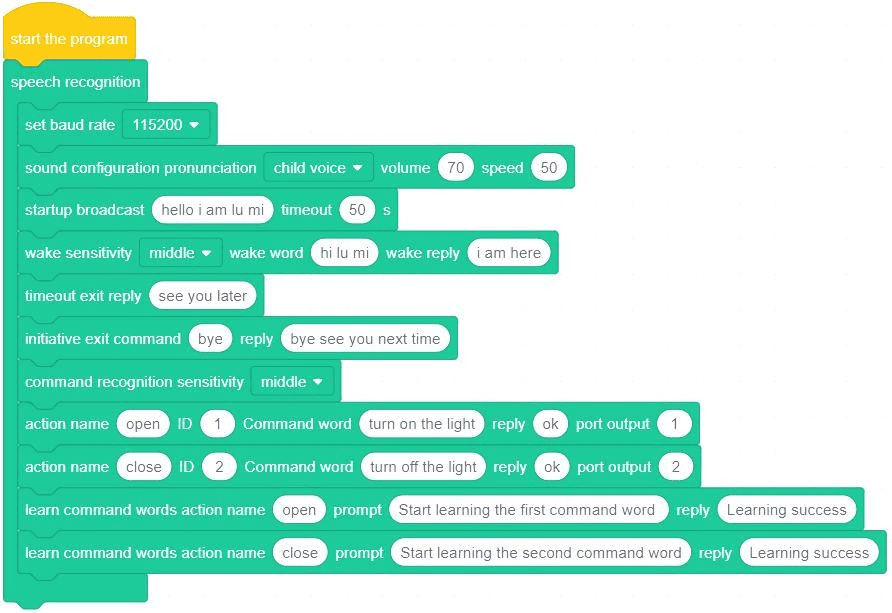
The speech recognition module’s self-learning feature allows users to modify control commands through voice input at any time, eliminating the need for manual firmware updates and uploads. However, if you want to activate this self-learning capability, you’ll need to update the firmware with additional self-learning instructions. This process only requires a single operation.
1. Open Firmware #
Click to open the voice self-learning firmware program Self-learning firmware.sb3
2. Instruction Set for Firmware #

This command allows modifying voice commands for specific actions through its self-learning feature. The first parameter identifies the action name, which must be previously recognized in voice commands. The second parameter specifies the prompt message when the voice command is successfully configured.
Note: The number of voice commands learned on your own is the same as the number of voice-controlled commands created in the firmware at the beginning.
3. Upload to Learn Firmware Instructions #
The steps for learning firmware upload are the same as in Section 6. Please go back to the previous section.
The Use Method of Speech Self-learning #
In the process of voice control, when the user needs to use the custom voice control command, the following methods should be used.
1. Instructions for Self-learning Commands #
| Self-learning
Command Words |
Functional Description |
|
Learn wake-up words |
This command is used for the voice module to learn the wake word. After using this command, the user needs to say a new wake word according to the voice prompt for the voice module to learn. After the voice module learns successfully, a new wake word
will be added. |
|
Learn command words |
This command is used for the voice module to learn command words. After using this command, the user needs to say a new command word for a certain behavior according to the prompt for the voice module to learn. After the voice module learns
successfully, a new command word will be added to |
| a certain behavior. | |
|
Relearn |
This command is used to relearn the command word. When the learning command word is enabled, if you are not satisfied with the current command word, you can use this command to relearn the
command word |
| Exit learning | This command is used to exit self-learning |
|
Delete learning |
This instruction is used to enable the delete
self-learning instruction |
|
Delete wake-up words |
This command is used to delete the wake word of
self-learning |
|
Delete command words |
This directive is used to delete self-learning
command words |
|
Delete all |
This command is used to delete all instructions from the self-learning, including the command word and
wake word |
| Exit deletion | This directive is used to exit deletion |
2.Self-learningCommand Word Use Process #
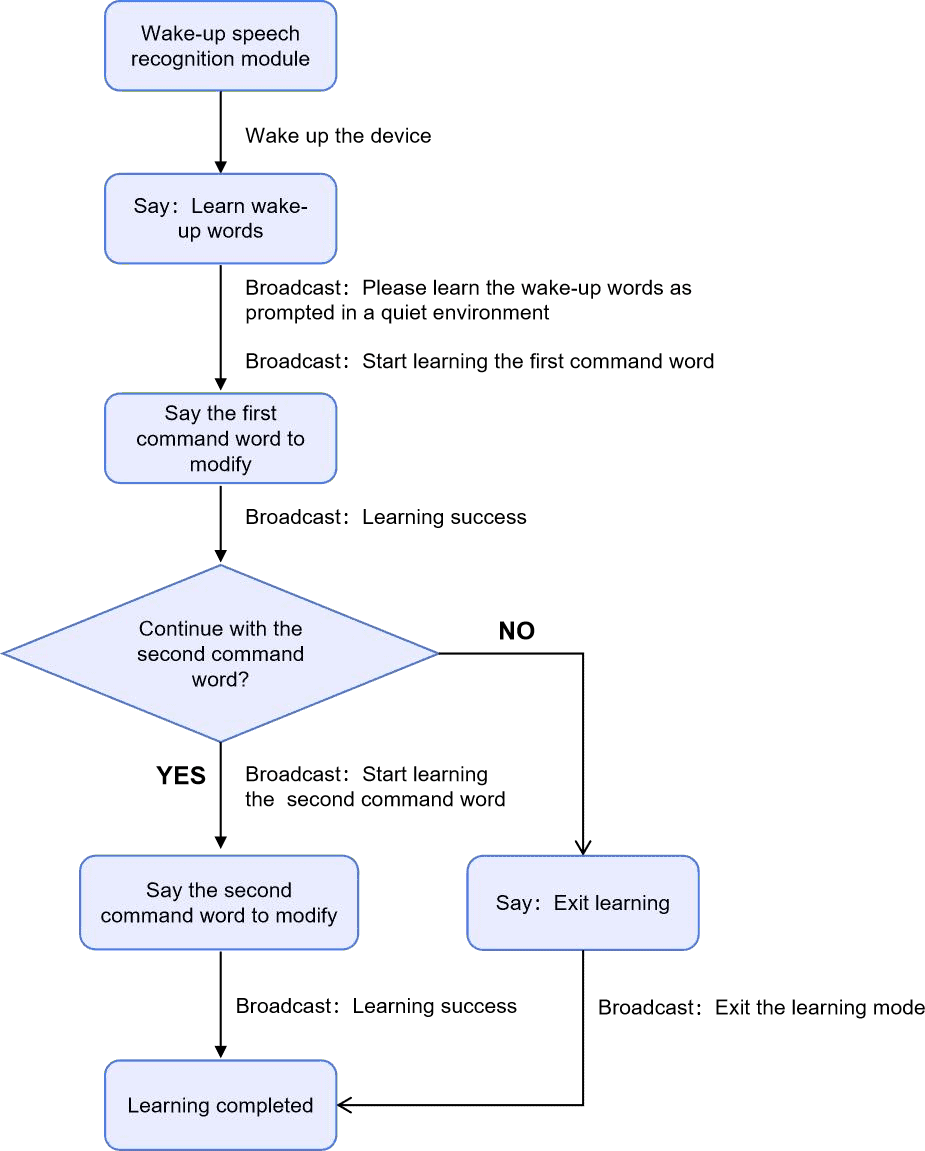
When you’re done, you can control the LED lights with the new command words.
Note: When learning a command word by yourself, the original command word is also retained.
3. Delete Command Word Usage Flow #
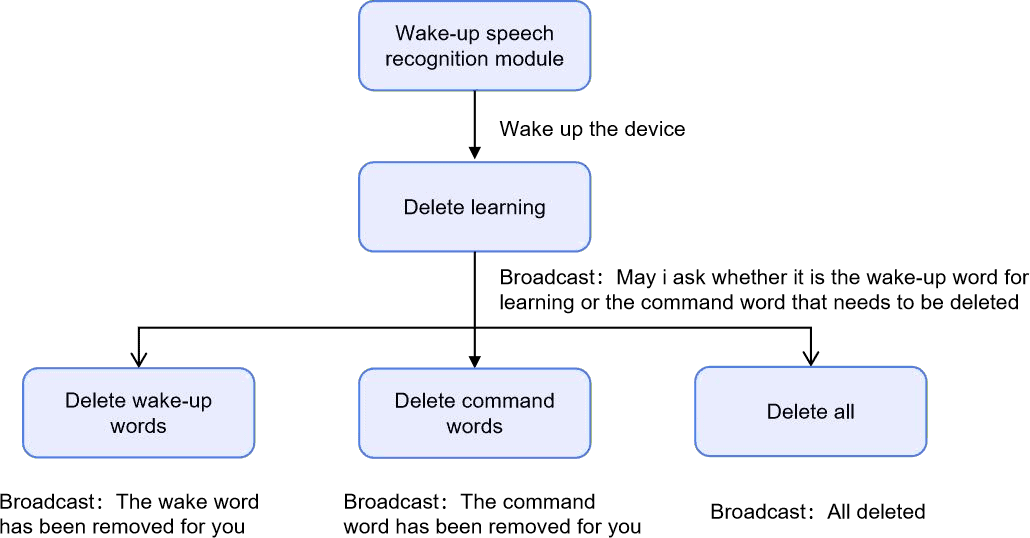
Note: The original command word and wake word will not be deleted after the self-learning command word or wake word is deleted.
4. Self-learn the use of wake-up words #
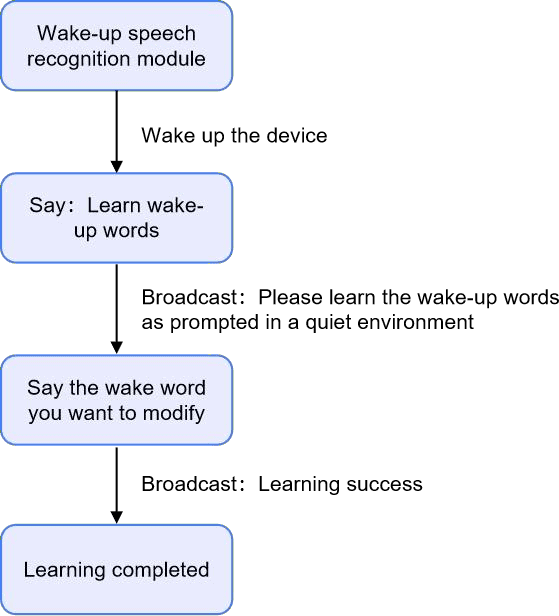
Note: When you learn the wake word by yourself, the original wake word will also be retained.
Related Resources #
Get Quotation or Buy From #
B2B Business: info@acebott.com